


Windy.com - Weather Forecast
Windyty SE
Weather apps usually earn a place on my phone by answering one simple question quickly: should I leave now, carry a coat, or change my plans? Windy.com takes a much broader approach. It is a weather app from Windyty SE that turns forecasts into moving maps for wind, rain, temperature, waves, ocean conditions, satellite imagery, radar, and hurricanes. I found it more demanding than a standard daily forecast, but also far more useful when weather is part of a real decision rather than a quick glance.
My first impression was that this is not designed as a decorative forecast with a large temperature number and a friendly background. The map is the starting point, and the amount of information can feel like a lot when all I want to know is whether an umbrella is sensible. Once I accepted that difference, the app became easier to understand. It is best viewed as a visual forecasting workspace that happens to fit on a phone, not simply a replacement for the weather widget already on the device.
After using it through ordinary planning, changing conditions, and repeated checks over time, I think its lasting value depends on how closely weather affects your routine. For hikers, sailors, pilots, cyclists, photographers, travelers, and anyone living near a coast or an area with quickly changing conditions, it can become a dependable habit. For someone who only wants tomorrow’s high and low, it may remain more complicated than necessary.
Related News

AccuWeather: Revolutionizing Mobile Meteorology

Stay Ahead of the Storm with Weather & Radar's Real-Time Tracking
Why the Weather App is Your Go-To for Accurate Forecasts
Why the first week feels so impressive
The strongest part of the early experience is the map itself. Instead of forcing me to interpret a list of locations, Windy.com lets me look at weather as a moving pattern across a region. Wind direction becomes easier to understand when I can follow its flow, while rain and cloud layers help connect what is happening nearby with what may arrive later. This is especially helpful when a forecast seems contradictory: one neighborhood may stay dry while a nearby ridge or coastline receives very different conditions.
I also liked being able to switch between weather layers rather than treating the forecast as one single answer. A wind map can tell a different story from a rain map, and wave or ocean information matters more than an ordinary temperature forecast when the day involves water. Satellite and radar views add another practical perspective because they show what is already developing, not only what a forecast model expects to happen.
Related News

Instagram Is No Longer a Photo App. It Is an Attention Engine

Microsoft Teams Mobile: When Collaboration Becomes Navigation

How the NFL App Adapts to Android and iOS Updates

Temu: Elevate Your Shopping Experience to Billionaire Status

Why Traffic Rider Works Best as a Precision Reflex Game

How Google’s Find Hub Transforms Everyday Searches
That variety creates a useful first-week experiment. I could check the normal forecast in the morning, inspect the wind before heading out, and then return to radar when clouds began building. The app encouraged me to compare the broad pattern with what I could actually see outside. That made it feel less like a passive notification tool and more like a way to learn how local weather behaves.
A realistic example is a weekend bike ride. A basic weather app might show a comfortable temperature and a modest chance of rain. In Windy.com, I can examine the wind direction along the route, see whether rain is moving toward the starting point or away from it, and check whether the return journey will be harder because the wind changes. That does not guarantee a perfect prediction, but it gives me better context for deciding whether to shorten the route or leave earlier.
The same approach works for travel. Before driving across a large area, I can look beyond the departure city and inspect conditions along the whole trip. A single local forecast often hides the transition between regions. Windy.com makes those changes visible, which is one of the app’s less obvious strengths: it helps me think in terms of weather systems and routes rather than isolated place names.
Gallery
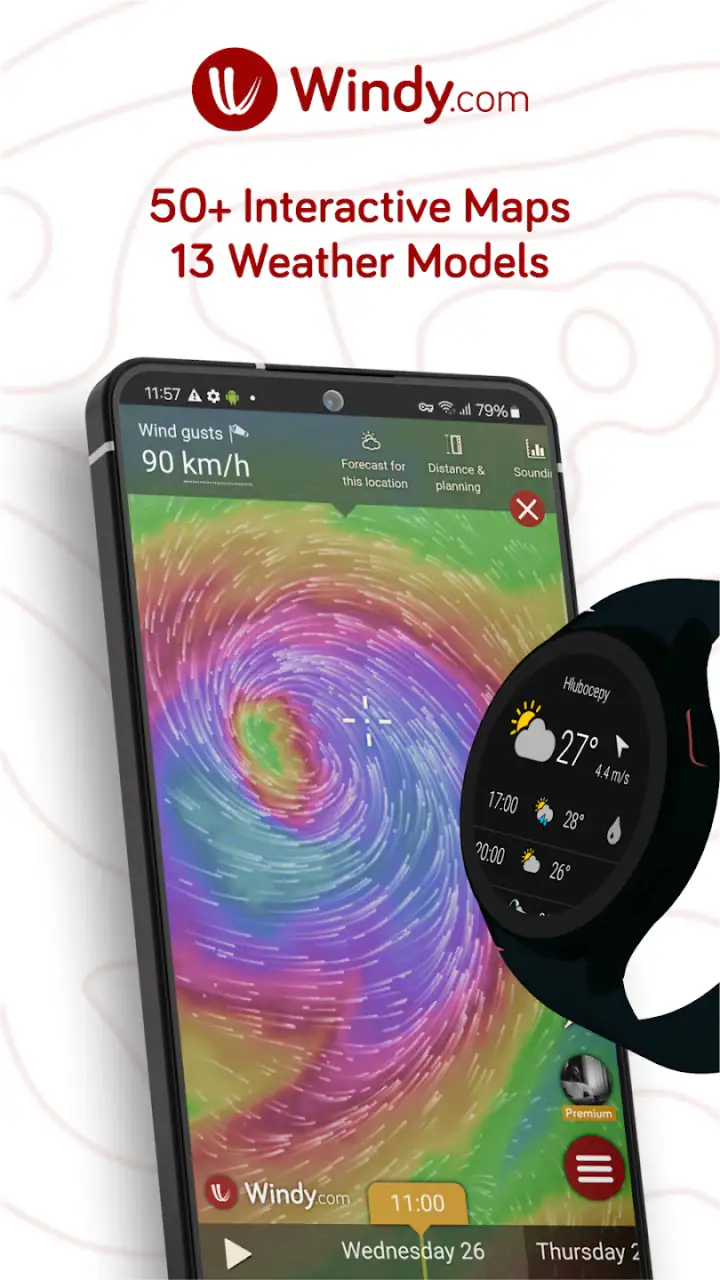
There is a learning curve, though. The moving layers, controls, symbols, and forecast views can be confusing at first, especially on a smaller phone. I needed time to understand which layer answered which question and when a map was more useful than a simple forecast panel. The app rewards curiosity, but it does not always feel instantly calm or simple.
For that reason, I would not judge it after opening every option at once. My better starting method was to choose one familiar location, inspect the basic forecast, then add only the layer relevant to the day’s plan. If I was commuting, rain and wind were enough. If I was visiting the coast, waves and ocean conditions deserved attention. This gradual approach makes the first week much less overwhelming.
Turning maps into a daily decision
The app becomes more practical when I begin with a question instead of browsing randomly. “Will the rain reach me before lunch?” calls for radar and precipitation movement. “Will the beach be comfortable?” requires more than temperature; wind and wave conditions may matter more. “Can I safely plan an outdoor event?” means looking at the wider trend rather than trusting one attractive hour.
One useful habit is to check the same location at two different times before making a sensitive plan. If the forecast changes noticeably between checks, I treat that as a sign to keep the plan flexible. I do not read the map as a promise. I use it to identify uncertainty, direction, and timing. That is a more mature way to use a forecast than simply searching for a reassuring icon.
Hurricane and severe-weather viewing is another area where the visual format makes sense. A map helps me understand the affected region and the direction of movement more naturally than a paragraph of text. Even so, I would never use the app as my only source for emergency decisions. During dangerous conditions, official local alerts and instructions should take priority. Windy.com is valuable for context, but context is not a substitute for authoritative warnings.
The app is free to install, which makes experimenting with this deeper style of weather information easy. It is intended for Everyone 10+, runs on Android from version 8.0 onward, and has been available since February 14, 2016. Those details matter if you are installing it on an older device or choosing an app for a younger family member, although the interface itself is more advanced than the age guidance might suggest.
What remains useful after the novelty fades
The first-week excitement comes from exploring animated maps. The longer-term value comes from whether those maps save me from making poor plans. In my experience, they do when I repeatedly deal with wind, changing rain, coastal conditions, or travel across several areas. The app is less compelling when my routine is almost entirely indoors and I only need a rough temperature estimate.
For regular outdoor activities, the most valuable workflow is not checking everything. It is building a short routine around the conditions that can actually disrupt the activity. A runner may care about rain timing, heat, and wind. A photographer may care about cloud movement and visibility. A boater may focus on wind, waves, and ocean conditions. By limiting the view to those questions, the app becomes a tool rather than a hobby.
I found the map particularly helpful for identifying wind as a hidden factor. Many ordinary forecasts give wind speed a secondary position, even though it can determine whether a cycling route feels pleasant, whether a picnic is comfortable, or whether a coastal walk is exposed. Windy.com puts wind in a central role, so I started noticing situations where a mild temperature was misleading because strong or badly directed wind would change the experience.
Another lasting advantage is the ability to compare nearby places. A forecast for one town may not represent a hilltop, harbor, valley, or open field a short distance away. Looking at the surrounding pattern helps me avoid false precision. I still expect local differences, but the map gives me a better reason for choosing one location over another instead of relying on a single generic city forecast.
This is also where the app compares well with familiar alternatives. Standard weather apps are usually better for speed, notifications, and a low-effort daily glance. They often make the current condition and near-term forecast immediately readable. Windy.com is better when I need to explore the situation, compare locations, or understand movement across a wider area. I would not replace every simple weather tool with it; I would use it when the ordinary forecast leaves important questions unanswered.
The large user base supports that impression. Windy.com has passed over 50 million installs and holds a 4.7 average from around 793 thousand ratings, with roughly 10 thousand written reviews. Those figures do not prove that every forecast will suit every location, but they do show that the app has become a serious option rather than a niche experiment. I also appreciate that its popularity has not pushed it toward a purely simplified design; it still serves people who want detail.
Its developer, Windyty SE, has maintained a product with enough depth to support repeated use, but depth creates responsibility for the user. I need to learn what I am looking at and avoid treating every colored area as equally meaningful. A dramatic visualization can feel more certain than it really is. The app is strongest when I use it to compare signals and plan conservatively, not when I search for a single perfect answer.
Small workflows that make a real difference
For a morning commute, I would first check the expected rain window, then inspect wind direction before choosing a bicycle or walking route. If rain appears close to the departure time, radar gives a more immediate view of what is approaching. This two-step check is faster and more useful than repeatedly refreshing a general forecast because each view answers a different question.
For a day near the water, I would not stop at the temperature. I would check wind, waves, and ocean conditions together, then compare the beach or harbor with a nearby sheltered area. A warm forecast can still produce an unpleasant or unsafe outing when wind and wave conditions are unfavorable. This is one of the clearest cases where Windy.com offers information that a basic weather app may not place at the center.
For a road trip, I would inspect the route in sections rather than only checking the destination. Weather can change across elevation, coastline, and distance. The map encourages that broader view, and it can reveal why a departure time that looks fine locally may become less attractive later in the journey. I would still check traffic and official travel guidance separately, but the weather planning itself becomes much more informed.
For a stormy day, I would use the app to understand the scale and movement of the system, then confirm safety instructions through local authorities. The practical insight is knowing where Windy.com ends: it is excellent for visual context and planning, but it should not become the sole decision-maker when lives, travel safety, or emergency instructions are involved.
The maintenance cost of keeping it useful
Windy.com does not demand much maintenance in the usual sense, but it does demand attention. A simple weather widget can become invisible in the best way: I glance at it and move on. This app asks me to choose layers, interpret movement, and decide which information matters. That effort is worthwhile only when the weather has consequences for my plans.
The main maintenance task is building a repeatable viewing routine. Without one, I can waste time exploring maps that are interesting but irrelevant. I recommend saving the app for decisions where wind, precipitation timing, waves, or regional differences matter. For ordinary indoor days, a simpler forecast may be the more efficient choice.
There is also a mental maintenance burden. Because the app exposes many details, it can encourage overchecking. I have to resist opening it every hour just to watch the forecast shift. Forecasts naturally change as new information becomes available, and constant checking can create anxiety without improving a decision. A useful rule is to check when a plan is being made, when conditions are changing, and when the activity itself requires a final safety review.
The free model makes the app easy to keep installed, while optional in-app purchases range from $1.49 to $114.99 per item. That wide range means I would look carefully at what an optional purchase adds before paying. The free experience is already substantial enough to judge whether the map-based approach fits my habits. I would not buy anything simply because the interface feels advanced; I would first identify a recurring need that the purchase genuinely addresses.
Storage on an older phone is not the only compatibility concern. The minimum operating system is Android 8.0, so anyone using an older Android device should check that requirement before planning around the app. On a capable phone, the detailed maps are enjoyable, but on a small screen they can still feel crowded. A tablet or larger display would make regional analysis more comfortable, although the phone remains practical for quick checks.
Another maintenance issue is remembering that different layers describe different time horizons and phenomena. Radar is useful for what is happening or approaching, while broader forecast views help with planning ahead. Satellite imagery shows observed cloud patterns rather than replacing every forecast view. I found that separating those roles prevented me from expecting one layer to answer everything.
Where repeated use can become tiring
The biggest source of fatigue is visual density. The app can feel like a cockpit when I only wanted to know whether to bring a jacket. Colors, animation, and controls are powerful, but they also compete for attention. If your ideal weather experience is one large number and a short sentence, this will probably feel like work rather than convenience.
There is a second kind of fatigue: interpretation can become false confidence. A smooth animated map looks precise, yet local weather remains variable. I have to remember that a detailed display does not automatically mean a certain outcome. The app gives me more ways to inspect a forecast, not a guarantee that the forecast will be right at every street corner.
People who mainly need dependable alerts may prefer a conventional weather app or an official local service. Windy.com’s strength is exploration and comparison, not necessarily the quickest possible glance. Likewise, someone who never plans outdoor activities, water trips, or longer journeys may gain little from the extra layers. Installing it because it looks impressive is not enough reason to keep it.
The hurricane view can also be emotionally intense. Seeing a large system move across a map is informative, but it may encourage repeated monitoring without a clear action attached. I think the best practice is to use it to understand the wider situation, then follow local emergency guidance and focus on concrete preparations. The app should reduce confusion, not become another source of compulsive checking.
There is a practical trade-off between detail and accessibility. Experienced weather users will appreciate the ability to inspect several conditions in one place. New users may need a few sessions before the controls feel natural. I would recommend it to a curious beginner who is willing to learn, but not to someone who has already decided that weather information should be effortless and nearly invisible.
Compared with a basic radar app, Windy.com offers a broader picture because radar is only one part of its visual toolkit. Compared with a standard forecast app, it offers more context but less instant simplicity. Compared with specialist marine or aviation tools, it may be a useful general planning companion, but I would not assume that a broad consumer weather app replaces equipment, training, or professional guidance for high-risk activities.
My long-term verdict on keeping it installed
After the novelty fades, Windy.com earns lasting space on my phone when I use weather as part of planning rather than as casual trivia. Its recurring value comes from seeing relationships: wind with route choice, rain movement with departure time, waves with coastal comfort, and regional patterns with travel decisions. Those connections are more useful than collecting isolated forecast numbers.
I would keep it installed if I cycled regularly, spent time outdoors, traveled through changing terrain, lived near the sea, or needed to understand storms at a wider scale. I would also recommend it to anyone who has ever looked at a basic forecast, found it too vague, and wished to see what was happening around the location instead of only inside it.
I would skip it if my only requirement was a quick morning temperature, a simple rain reminder, or a clean home-screen widget. In that situation, a lighter weather app is likely to become a better habit because it removes friction. More information is not automatically more helpful when the decision itself is simple.
The app’s free entry point makes that choice easy to test, and its broad adoption gives it credibility without removing the need for personal judgment. I like that it can grow with the user: a beginner can start with one map layer, while a more experienced weather watcher can build a deeper routine. The trade-off is that I have to manage that complexity rather than expecting the app to do all the thinking for me.
My final recommendation is therefore selective but positive. Windy.com is worth keeping when changing weather affects what you do, where you go, or how safely you plan. It is not the most relaxing replacement for a simple forecast, and its detailed interface can become tiring when used without a clear purpose. But once I match the layers to a real decision, the app stops feeling like a novelty and becomes a practical weather habit I can return to month after month.
FAQs for Windy.com - Weather Forecast
What features does Windy.com offer for weather forecasting?
Windy.com provides comprehensive weather forecasts with features like real-time satellite and radar imagery, wind maps, and detailed forecasts for various weather conditions. It includes models like ECMWF, GFS, and NAM, offering global coverage. Users can customize their experience with layers for temperature, precipitation, and storm tracks, making it ideal for meteorology enthusiasts.
Is Windy.com free to use, and are there any premium features?
Windy.com is free to use with most of its features available at no cost. However, it offers a premium subscription called Windy Premium, which includes additional benefits like faster data updates, advanced forecast models, and more layers. The subscription enhances the user experience but is not necessary for basic functionality.
How accurate are the weather forecasts on Windy.com?
Windy.com is known for its high accuracy due to the use of leading weather models like ECMWF and GFS. While no forecast can be 100% accurate, Windy.com provides reliable data by integrating multiple models and updating forecasts frequently. Users often find its predictions to be more precise than many other weather apps.
Can Windy.com be used offline, and does it work on both Android and iOS?
Windy.com requires an internet connection to access up-to-date weather data and maps. However, once the data is loaded, you can view it offline for a limited time. The app is available for both Android and iOS, ensuring compatibility with a wide range of devices. Regular updates ensure smooth performance across platforms.
How user-friendly is the Windy.com interface for beginners?
Windy.com boasts an intuitive and visually appealing interface, but it may seem complex to beginners due to its extensive features. The app offers tutorials and a user guide to help new users navigate the various tools and settings. With a bit of exploration, users can quickly learn to customize their weather viewing experience.
Pros
- Highly accurate weather data.
- Detailed wind and wave information.
- Customizable weather alerts.
- Intuitive and user-friendly interface.
- Offline maps for remote areas.
Cons
- Requires a stable internet connection.
- Some features are premium.
- Interface may overwhelm beginners.
- Battery consumption can be high.
- Limited social sharing options.


